

🕐 Read Time: 16 min
Dermatology EHR for Medical and Cosmetic Practices: The Complete Guide to Managing Hybrid Workflows
Most EHR systems are built for one type of practice. A dermatology clinic running both medical and cosmetic services does not fit that mold.
A patient booked for an acne follow-up may also ask about Botox during the same visit. A medspa offering laser resurfacing may also bill insurance for cryotherapy. These are not edge cases. They are daily realities for thousands of hybrid dermatology practices across the United States.
The challenge is not simply using two different billing models. It is managing two fundamentally different clinical and operational workflows inside the same practice, often with the same staff, on the same day.
Most EHR platforms fail here. They are designed for either insurance-based clinical care or cash-pay cosmetic services, rarely both. The result is disconnected workflows, billing errors, inventory gaps, and documentation that does not support the full scope of what hybrid practices actually do.
This guide breaks down what makes a hybrid dermatology practice operationally distinct, what an EHR must handle to support it effectively, and how to evaluate platforms based on real workflow requirements rather than feature checklists. Edvak is one platform built specifically to address this challenge, and its features are referenced throughout where relevant.
What Makes Dermatology Different from Other Specialties
Dermatology occupies a unique position in US healthcare. It bridges clinical medicine and elective aesthetics in a way that almost no other specialty does.
A primary care or internal medicine practice deals almost entirely with insurance-covered services. A medspa operates almost entirely on cash pay. Dermatology often does both, sometimes within a single patient visit.
This creates operational complexity that general-purpose EHR systems are not built to handle. Consider what a typical hybrid dermatology day looks like:
- A patient arrives for a biologic injection for psoriasis, covered by insurance with a prior authorization on file.
- The next patient is scheduled for a chemical peel, paid at checkout via credit card.
- A third patient is receiving a series of laser treatments for rosacea, billed as a package with a pre-purchased block of sessions.
- A fourth patient, initially booked for a mole check, asks about filler during the exam.
Each of these scenarios has different documentation requirements, different billing paths, different consent forms, and different inventory implications.
Dermatology also relies heavily on visual tracking. Skin conditions change over time, and progress cannot always be captured in numeric values the way blood pressure or A1C can be. Photo documentation is a clinical necessity, not an optional feature.
Additionally, dermatology has one of the highest procedure volumes per visit of any outpatient specialty. A single visit may include a skin exam, a biopsy, a cryotherapy treatment, and a product recommendation, all of which need to be captured accurately for both clinical and billing purposes.
For deeper context on how AI is reshaping documentation in this specialty, the AI EHR workflow for dermatology practices overview provides useful background.

Medical vs Cosmetic Dermatology Workflows
Understanding the operational differences between medical and cosmetic dermatology is essential before evaluating any EHR platform.
Medical Dermatology Workflow
Medical dermatology involves the diagnosis and treatment of skin conditions covered, in whole or in part, by health insurance. Common services include:
- Acne management (prescription topicals, oral antibiotics, isotretinoin)
- Psoriasis treatment (topicals, biologics, phototherapy)
- Eczema and atopic dermatitis management
- Skin cancer screening, biopsy, and excision
- Cryotherapy for warts and keratoses
- Patch testing for contact dermatitis
The workflow for medical dermatology typically follows this structure:
- Patient scheduling with insurance verification
- Intake and chief complaint documentation
- Clinical exam with structured SOAP notes
- Diagnosis coding (ICD-10)
- Procedure documentation and CPT coding
- Prior authorization where required
- Claims submission to the payer
- Payment posting and follow-up on denials
Auto Capture of ICD and CPT Codes directly supports this workflow, reducing the manual burden on clinical and billing staff. Real-Time Insurance Eligibility Checks prevent claim rejections at the source by verifying coverage before the appointment begins.
For practices dealing with high denial rates on medical claims, the dermatology claim denials guide for California practices outlines common coding pitfalls that affect reimbursement.
Cosmetic Dermatology Workflow
Cosmetic dermatology involves elective procedures that are not covered by insurance. These include:
- Botox and neuromodulator injections
- Dermal fillers (hyaluronic acid, collagen stimulators)
- Laser and light-based treatments (IPL, fractional resurfacing, hair removal)
- Chemical peels and microdermabrasion
- Body contouring treatments
- Retail skincare product sales
The cosmetic workflow operates differently:
- Consultation with goals assessment
- Consent form completion (procedure-specific)
- Pre-treatment photography
- Treatment delivery
- Product dispensing or retail sale
- Follow-up scheduling for series or maintenance treatments
- Cash or card payment collection at checkout
Cosmetic services typically involve package pricing, prepaid bundles, or membership-based models. Inventory management is critical because injectables, laser consumables, and retail products all need to be tracked by usage and replenishment.
Payment Processing and package management capabilities determine how smoothly cosmetic revenue flows through the practice.
Where the Two Workflows Collide
In a hybrid practice, a patient may shift from medical to cosmetic within a single visit. A dermatologist treating a patient for rosacea may also administer IPL therapy, which could be partially insurance-covered or fully elective depending on the plan.
This crossover creates documentation, coding, and billing complexity that most EHR systems are not designed to manage. The system must be able to handle a split visit cleanly, attributing each service to the correct billing path without manual workarounds.
For practices looking at how documentation workflows differ between medical and cosmetic encounters, the EMR documentation workflow for Texas dermatology provides a practical breakdown.

Why Most EHR Systems Fail Hybrid Dermatology Clinics
The EHR market is large, and there are dozens of platforms marketed to dermatologists. However, most of them are built around one core model and add the other as an afterthought.
Built for Medical, Cosmetic Bolted On
Platforms that originate in clinical EHR development typically handle insurance billing well. They have robust claim management, ICD-10 coding support, and prior authorization tools. However, cosmetic workflows feel like an add-on because they are.
Inventory management is often absent or limited. Package and bundle pricing is not natively supported. Cash-pay checkout is awkward. Photo documentation may exist but is disconnected from clinical notes.
Built for Medspa, Medical Bolted On
Medspa-first platforms handle cosmetic scheduling, cash-pay checkout, and before-and-after photography well. However, they struggle with insurance billing, clinical documentation standards, and the regulatory requirements of a physician-led medical practice.
They may not support e-prescribing. They often lack the clinical decision support tools required for managing complex skin conditions. Prior authorization and claim denial management are weak or absent.
The Result: Fragmented Operations
When a hybrid practice uses a platform that only partially fits, the gap is typically filled with:
- A second software platform for the missing workflow
- Manual spreadsheets for inventory or package tracking
- Paper-based consent forms disconnected from the EHR
- Separate photo storage outside the patient record
This fragmentation creates real operational and revenue risk. Staff spend time manually transferring data between systems. Billing errors increase when procedures are documented in one platform and coded in another. Compliance risk rises when photo consent is disconnected from the clinical record. Platforms like Edvak are designed to eliminate this fragmentation by unifying both workflows inside a single system.
The top 5 dermatology EHR software comparison for 2026 evaluates how leading platforms perform on hybrid workflow support specifically.
Key Requirements of a Dermatology EHR for Hybrid Practices
A dermatology EHR built for hybrid practices must meet a specific set of requirements. Each one addresses a real operational need, not a marketing differentiator.
Dual Workflow Architecture
The platform must natively support both insurance-based clinical encounters and cash-pay cosmetic encounters. This means separate documentation templates, billing paths, and scheduling categories that coexist in the same system without workarounds.
Dermatology-Specific Templates
Generic SOAP note templates do not serve dermatologists well. The system should include skin exam templates that support body surface mapping, lesion documentation, and procedure-specific notes for common dermatology procedures.
Electronic Health Records with specialty-specific templates reduce documentation time and improve clinical accuracy.
Photo Documentation Integrated with the Chart
Photos must be linked directly to the patient record, organized by date and visit, and accessible alongside clinical notes. This is a clinical requirement for tracking conditions like melanoma, psoriasis, and acne over time, and a practical requirement for cosmetic before-and-after comparison.
For a detailed look at how photo workflows function in modern platforms, the dermatology photo documentation EHR guide covers technical and workflow considerations in depth.
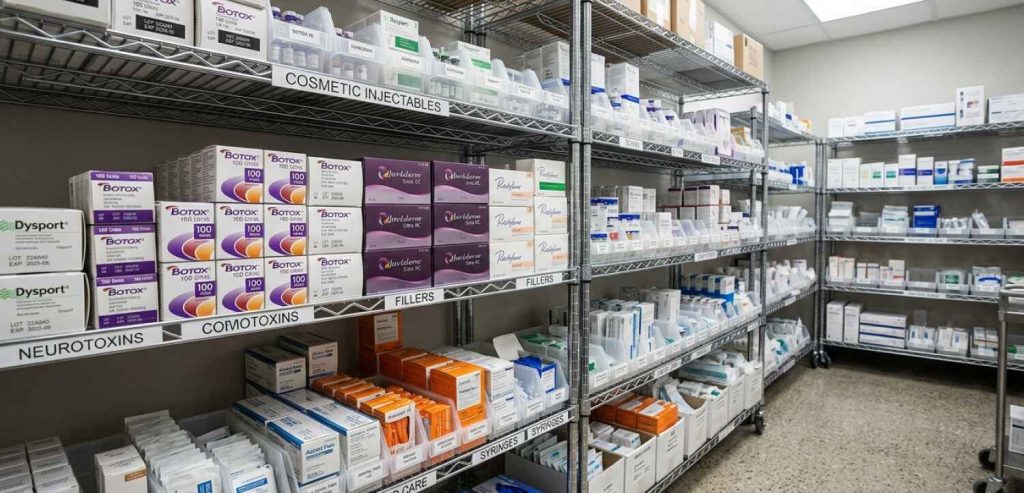
Inventory Management for Injectables and Retail
Practices dispensing Botox, fillers, or retail skincare products need inventory tracking at the unit level. The system should track stock levels, flag low-inventory alerts, and connect product usage to the clinical encounter.
The dermatology inventory tracking with AI EHR guide explains how inventory management integrates with the clinical and billing workflow in dermatology-specific EHRs.
Package and Bundle Pricing
Cosmetic services are frequently sold as a series. A patient purchasing six laser sessions expects a package price tracked against remaining sessions. The EHR must support prepaid bundles, session tracking, and balance management without requiring a separate platform.
E-Prescribing
Medical dermatology generates a high volume of prescriptions. Isotretinoin requires iPLEDGE compliance. Biologics have REMS requirements. E-Prescribing and Medication Management must be integrated with the EHR, not a bolt-on module. For practices in Florida, the e-prescribing and medication management guide for Florida dermatology covers regulatory and workflow requirements in detail.
Scheduling That Separates Medical and Cosmetic Appointments
Scheduling complexity in a hybrid practice is significant. Medical appointments, cosmetic consultations, laser sessions, and product pickups all have different durations, room requirements, and staff assignments.
Scheduling tools should support appointment type differentiation, provider-specific calendars, and automated reminders by appointment type. For practices evaluating scheduling tools specifically, the dermatology scheduling software guide covers what to look for in a dermatology-specific scheduling module.
Patient Portal and Intake
Digital intake reduces front-desk burden and improves data accuracy. For hybrid practices, intake forms must support both medical history collection and cosmetic goal documentation.
Patient Portal access and Online Scheduling allow patients to complete intake before arrival, reducing check-in time and minimizing paper-based workflows. The dermatology patient intake software guide covers what effective digital intake looks like in a hybrid practice context.
Billing Differences: Insurance vs Cash-Pay
Billing is where hybrid dermatology complexity is most acute. The two billing models operate on fundamentally different logic, and a hybrid practice must run both simultaneously.
Insurance Billing in Medical Dermatology
Medical dermatology billing involves:
- Correct CPT code selection for the procedure performed
- ICD-10 diagnosis codes linked to each CPT code
- Modifier application where required (e.g., modifier 25 for a significant separate E/M on the same day as a procedure)
- Prior authorization tracking for biologics, phototherapy, and certain diagnostics
- Claims submission to the primary payer
- Secondary billing where applicable
- Denial management and appeals
This is operationally intensive. A busy dermatology practice may submit hundreds of claims per week. Errors in coding or documentation translate directly into denied claims and revenue loss.
Claims Management and Auto Capture of ICD and CPT Codes reduce error rates by pulling diagnosis and procedure data from the clinical note rather than requiring manual entry.
For practices managing revenue cycle at scale, Billing and Revenue Cycle Management handles claim submission, posting, and follow-up in a unified workflow.
The dermatology revenue cycle management guide for Florida practices and the dermatology billing and coding workflow overview both offer useful detail on how RCM functions in high-volume dermatology environments.
Cash-Pay Billing in Cosmetic Dermatology
Cosmetic billing operates on a different model:
- Services are priced by the practice, not determined by payer fee schedules
- Payment is collected at or before the time of service
- Package pricing and prepaid bundles require session tracking
- Refunds, credits, and membership management may apply
- No claims, no denials, no prior authorizations
The operational challenge is speed and accuracy at checkout. A patient completing a Botox appointment should be able to pay, receive a receipt, and schedule their next visit in under five minutes.
Payment Processing and integrated checkout tools support this workflow without requiring a separate point-of-sale system.
Split-Service Billing
Some visits involve both insurance-covered and cash-pay services. A patient may have a mole removed under insurance and then purchase a product or schedule a cosmetic consultation in the same visit.
The EHR must be able to handle a split billing encounter cleanly. The insurance-covered portion follows the claims path. The cash-pay portion is collected at checkout. Both should be documented in the same patient record without confusion or data loss.
Running both insurance and cash-pay billing from one platform? Edvak is built to handle exactly that. Book a 30-minute demo to see how it works for hybrid dermatology practices.
Role of Inventory and Product Management
Inventory management is a non-negotiable requirement for hybrid dermatology practices. It is also one of the most commonly underserved areas in general-purpose EHR platforms.
What Needs to Be Tracked
Hybrid dermatology practices typically manage inventory across three categories:
Injectables and biologics: Botox, Dysport, Xeomin, Restylane, Juvederm, Sculptra, and similar products are purchased in units or syringes and dispensed per treatment. Tracking usage per patient visit is necessary for accurate cost accounting and waste reduction.
Laser and device consumables: Certain laser platforms use disposable tips or treatment cartridges that must be tracked by use.
Retail skincare products: Practices selling medical-grade skincare lines need standard retail inventory management, including reorder points, supplier management, and sales tracking.
Why Disconnected Inventory Fails
When inventory is tracked in a spreadsheet or a separate platform, reconciliation becomes a manual task. Staff must match product usage from the EHR to inventory counts in another system. Discrepancies are common and often go undetected until a stockout occurs or a financial audit reveals unexplained losses.
An EHR with integrated inventory connects product usage directly to the clinical encounter. When a provider documents that 50 units of Botox were administered, the system deducts those units from inventory automatically. This eliminates manual reconciliation and provides real-time visibility into stock levels.
Inventory and Profitability
Injectables represent a significant cost of goods for cosmetic dermatology practices. Waste, theft, and over-ordering all reduce profitability. Accurate inventory tracking is not just an operational preference. It is a financial control.
Analytics and Reporting tools that connect inventory data to revenue and procedure volume give practice managers the visibility they need to optimize purchasing and reduce waste.
Importance of Photo Documentation
Photo documentation in dermatology serves two distinct purposes: clinical tracking and cosmetic comparison. Both require the same infrastructure but serve different goals.
Clinical Photo Documentation
For medical dermatology, photos provide a longitudinal record of how a condition changes over time. A suspicious lesion documented at one visit can be compared to subsequent images to assess growth or morphology changes. Psoriasis plaques can be quantified visually across treatment cycles. Acne severity can be tracked without relying solely on subjective descriptions.
Clinical photos must be:
- Linked directly to the patient chart
- Timestamped and associated with the relevant visit
- Accessible to the treating provider at any subsequent visit
- Stored securely and in compliance with HIPAA requirements
Cosmetic Photo Documentation
For cosmetic dermatology, before-and-after photos are a clinical necessity and a business asset. They support informed consent (showing patients realistic outcomes), document the baseline for liability purposes, and demonstrate results for practice marketing when appropriate patient consent exists.
Cosmetic photo workflows require:
- Standardized photography positioning by treatment area
- Side-by-side comparison views within the EHR
- Integration with consent documentation
- Easy retrieval during follow-up consultations
Why Disconnected Photo Storage Fails
Many practices store clinical photos in a separate system or shared drive. This creates two problems. First, the photos are not accessible within the clinical workflow, forcing providers to switch applications during a visit. Second, there is no guaranteed linkage between a photo and the clinical note it should accompany. Over time, this creates a fragmented and legally incomplete record.
Electronic Labs and Imaging capabilities within an integrated EHR keep photos connected to the chart from the moment they are captured. For practices evaluating their current photo workflow, the dermatology photo documentation EHR guide outlines what integrated photo management looks like in practice.
Managing Recurring Treatments and Care Plans
Recurring treatments are central to both medical and cosmetic dermatology revenue. Managing them effectively requires more than just scheduling.
Medical Recurring Treatments
Medical dermatology has several treatment categories that involve recurring visits:
- Phototherapy for psoriasis or vitiligo (typically two to three sessions per week over multiple weeks)
- Biologic injections on fixed intervals (every four, eight, or twelve weeks depending on the drug)
- Allergy patch testing (multi-day protocol)
- Isotretinoin monitoring (monthly visits with lab requirements)
Each of these requires:
- Scheduled visit sequences tied to the treatment protoco
- Lab order tracking where relevant
- Prior authorization renewal tracking
- Documentation that supports ongoing medical necessity
Automated Care Reminders reduce no-show rates for recurring medical appointments. Referral Management supports coordination with other providers involved in complex cases.
Cosmetic Recurring Treatments
Cosmetic recurring treatments include:
- Laser series (typically four to six sessions at fixed intervals)
- Injectable maintenance schedules (Botox every three to four months)
- Membership-based services with monthly or quarterly appointments
- Skincare peel series
These require:
- Package session tracking with remaining balance visibility
- Automated reminders tied to the maintenance interval
- Pre-scheduled follow-up booking at the time of each treatment
- Financial tracking of prepaid packages against used sessions
Care Plan Documentation
A care plan in dermatology is not simply a future appointment list. It is a documented clinical intention that connects the diagnosis, the treatment approach, and the expected timeline. For medical dermatology, care plans support ongoing insurance coverage justification. For cosmetic dermatology, they set patient expectations and drive retention.
Practice Management tools that support care plan documentation and recurring visit management reduce the administrative burden on clinical staff and improve patient follow-through.
Common Challenges in Hybrid Dermatology Clinics
Understanding where hybrid practices most frequently encounter operational friction helps prioritize EHR selection criteria.
Documentation Burden
Dermatology has one of the highest note complexity levels per visit across outpatient specialties. A single visit may involve a full-body skin exam, one or more procedures, medication management, and a cosmetic consultation. Documenting all of this accurately and efficiently is a significant challenge.
AI-Powered Documentation and Integrated Speech-to-text tools reduce the time providers spend on note completion. Conversation Capture to Structured Notes converts spoken clinical dialogue into structured chart entries without requiring manual transcription.
For practices exploring AI documentation tools, the AI documentation workflow for dermatology and the AI-powered EHR overview for Florida dermatology practices are useful references. Practices using voice-based documentation can review the voice-to-clinical-notes EHR guide for California dermatology and the speech-to-text EHR guide for Texas dermatology practices for implementation context.
The best AI scribe for dermatologists in California and the best AI scribe for Florida dermatology practices cover how ambient documentation tools function in real clinical settings. For practices looking at the full AI documentation workflow, the dermatology AI documentation workflow guide provides workflow-level detail on how structured notes are generated from clinical conversations.
Scheduling Complexity
A hybrid practice runs multiple appointment types that require different rooms, different staff, and different time allocations. A laser treatment requires the laser suite. A cosmetic consultation requires a private room. A biopsy requires a procedure room with specific supplies. Managing this across multiple providers and locations creates scheduling complexity that basic calendar tools cannot handle.
Scheduling systems with resource allocation, appointment type differentiation, and wait-list management are necessary at practices above a certain volume threshold. For a full breakdown of what to look for, the dermatology scheduling software guide is a practical reference. Practices in California can also review the best healthcare scheduling software for California dermatology practices for a state-specific perspective.
Staff Role Differentiation
Hybrid practices typically employ clinical staff (medical assistants, nurses, physician assistants) alongside cosmetic staff (laser technicians, esthetic nurses, medspa coordinators). Each role has different EHR access needs, documentation responsibilities, and workflow touchpoints.
Task Management tools that route work by role prevent tasks from falling through the gaps between clinical and cosmetic teams. Document Management and Fax Management keep communication organized across the full practice.
Patient Communication at Scale
Patients in a hybrid practice receive different types of communications depending on their service type. A medical patient may need a lab result, a prescription refill notification, or a prior authorization update. A cosmetic patient may need a package balance reminder, a maintenance schedule prompt, or a product recommendation.
2-way SMS Chat and Phone Calls and Automated Care Reminders support personalized communication by appointment type and patient profile. Patient Engagement tools that segment communications by service type prevent the confusion of sending a Botox maintenance reminder to a patient seen only for acne management.
Compliance and Consent Management
Hybrid practices manage a complex consent landscape. Medical procedures require informed consent documentation. Cosmetic procedures require procedure-specific consent forms that detail risks, alternatives, and realistic outcomes. Retail product sales may require allergy disclosures.
Consent forms must be captured digitally, linked to the patient record, and retrievable at any future visit. Document Management and Autofill Document Parser tools support efficient consent capture without paper-based workarounds.
How the Right EHR Improves Operations and Revenue
The operational and financial case for a purpose-built hybrid dermatology EHR is concrete. Each workflow improvement translates to measurable practice impact. Edvak addresses each of the areas below within a single unified platform.
Reduced Documentation Time
When AI-Powered Documentation and Integrated Speech-to-text are functioning well, providers spend significantly less time on note completion per encounter. In a high-volume dermatology practice, this time compounds across dozens of visits per day.
The AI documentation workflow overview provides context for how documentation efficiency improves with AI-assisted tools across different practice sizes and volumes.
Fewer Claim Denials
Real-Time Insurance Eligibility Checks at the time of scheduling, combined with Auto Capture of ICD and CPT Codes from the clinical note, reduce the most common sources of claim denial before they occur. Practices that have historically managed denials reactively can shift to proactive denial prevention.
The dermatology billing and coding workflow guide outlines how automated coding support reduces human error at the claim generation stage.
Improved Cosmetic Revenue Capture
Package tracking, session balance management, and automated maintenance reminders directly improve cosmetic revenue retention. Patients who are reminded of remaining sessions are more likely to complete their treatment series. Practices that track package balances accurately reduce revenue leakage from sessions used but not billed.
Inventory Cost Control
Real-time inventory visibility reduces over-ordering and prevents stockouts of high-cost injectables. Practices with integrated inventory typically report a reduction in discrepancy between product purchased and product billed, which directly improves gross margin on cosmetic services.
Better Patient Retention
Patient Engagement tools, including the Patient Portal, Online Scheduling, and Automated Care Reminders, improve patient experience and reduce the effort required to rebook. Practices with automated recall and reminder workflows typically see higher return visit rates for both medical and cosmetic services.
Practice-Level Visibility
Analytics and Reporting tools that surface revenue by service type, provider, and procedure allow practice managers to make informed decisions about staffing, scheduling, and marketing investment. Without this visibility, hybrid practices often underestimate the revenue contribution of cosmetic services or fail to identify underperforming service lines.
How to Choose the Right Dermatology EHR
Evaluating an EHR for a hybrid dermatology practice requires a structured approach. The following framework covers the most important decision dimensions.
Step 1: Map Your Actual Workflows
Before evaluating any platform, document how your practice currently operates. Include:
- The full patient journey for a medical encounter
- The full patient journey for a cosmetic encounter
- All points where the two workflows intersect
- The current tools used for billing, inventory, photos, and scheduling
This workflow map becomes your evaluation rubric. Any EHR you assess should be tested against each step.
Step 2: Prioritize Must-Have Features
Not every feature in a dermatology EHR matters equally to your practice. Based on your workflow map, identify the non-negotiable requirements, such as:
- Integrated insurance billing
- Cash-pay checkout with package tracking
- Integrated photo documentation
- Inventory management for injectables
- AI-assisted documentation
For a structured overview of what features matter most by practice type, the guide to choosing a dermatology EHR in the US for 2026 and the best dermatology EHR for US practices overview provide useful frameworks.
Step 3: Evaluate Billing Depth on Both Models
Ask each vendor to walk through a complete insurance claim cycle and a complete cash-pay transaction. Specifically test:
- How a split-service visit is documented and billed
- How package sessions are tracked and reconciled
- How denial management is handled
- What the checkout experience looks like for a cosmetic patient
The EzDerm vs Edvak dermatology EHR comparison for 2026 and the Edvak vs ModMed comparison for small dermatology practices provide side-by-side analysis of how leading platforms handle these scenarios. Edvak performs well on both split-billing and package management in these comparisons.
Step 4: Assess Data Migration Support
Switching EHR platforms involves migrating years of patient data, including clinical notes, photos, billing history, and demographic information. Vendors vary significantly in how much migration support they provide and at what cost.
The dermatology EHR data migration guide covers what to expect from migration and how to evaluate vendor support commitments before signing a contract.
Step 5: Understand Total Cost of Ownership
EHR pricing in dermatology varies widely. Some platforms charge per provider per month. Others charge a percentage of collections. Some bundle all features; others charge separately for AI documentation, telehealth, or advanced analytics.
The dermatology EHR pricing guide for 2026 breaks down common pricing models and the total cost implications for practices of different sizes.
Step 6: Evaluate Implementation and Training Support
A platform’s quality at implementation is as important as its feature set. Ask specifically:
- How long does implementation typically take?
- What training is included and in what format?
- What is the support model after go-live?
- Are there dermatology-specific implementation specialists?
Step 7: Request References from Hybrid Practices
General references from dermatology practices are useful. References specifically from hybrid practices managing both medical and cosmetic workflows are more valuable. Ask vendors to connect you with practices of similar size and service mix.
Why Edvak Is a Strong Option for Hybrid Dermatology Practices
Edvak is a cloud-based EHR and practice management platform built with specialty workflows in mind. For hybrid dermatology practices, it addresses several of the most common operational gaps that general-purpose platforms leave unfilled.
Unified Medical and Cosmetic Workflow Support
Edvak’s Advanced EHR is designed to support both insurance-based clinical documentation and cash-pay cosmetic encounters within a single system. Providers can document a medical encounter and a cosmetic service in the same visit without switching platforms or workarounds.
AI-Powered Documentation
Edvak includes AI-Powered Documentation, Integrated Speech-to-text, and Conversation Capture to Structured Notes capabilities. For dermatologists managing high-volume days with complex multi-procedure visits, these tools reduce note completion time without sacrificing documentation accuracy.
Telehealth with AI Scribe extends this capability to virtual consultations, which are increasingly common for cosmetic consultations and post-procedure follow-ups.
For state-specific implementation context, the best AI scribe for dermatologists in California, the best AI scribe for Florida dermatology, and the best EHR for dermatology clinics in Texas guides cover how these tools function in different regulatory environments. The voice-to-clinical-notes EHR guide for Florida dermatology provides additional implementation detail for voice-driven documentation workflows.
Integrated Billing for Both Revenue Streams
Edvak’s Billing and Revenue Cycle Management handles insurance claims and cash-pay transactions in the same billing environment. Claims Management, Auto Capture of ICD and CPT Codes, and Real-Time Insurance Eligibility Checks support the medical billing workflow. Cash-pay checkout and package management support the cosmetic revenue side.
Practice Management Tools Built for Complexity
Practice Management features including advanced scheduling, task management, referral management, and document management are designed to support the operational complexity of a hybrid practice rather than a single-service model. The dermatology practice management software guide for 2026 provides a broader look at how these tools fit into a complete practice operations stack.
Patient Engagement Across Service Types
Patient Engagement tools including the Patient Portal, 2-way SMS Chat and Phone Calls, Automated Care Reminders, and Online Scheduling support personalized communication across both medical and cosmetic patient populations.
Analytics Across the Full Practice
Analytics and Reporting tools give practice owners and administrators visibility into revenue by service line, provider, and procedure type. This is particularly valuable for hybrid practices that need to understand the relative contribution of medical and cosmetic services to overall practice performance.
Pricing Tiers
Edvak offers tiered pricing designed to accommodate practices at different stages of growth. Solo and small practices (one to three providers) can access core EHR, billing, and patient engagement features without paying for enterprise-level tools they do not yet need. Mid-size and group practices (four to ten or more providers) have access to advanced analytics, multi-location support, and expanded automation capabilities.
Specific pricing for your practice size and configuration is available through a direct consultation with the Edvak team. For a broader comparison of how Edvak’s pricing compares to competing platforms, the dermatology EHR pricing guide for 2026 provides a useful benchmark.
For practices currently evaluating Edvak alongside other platforms, the best dermatology EMR for California clinics and the best AI dermatology EHR for 2026 offer independent analysis. The best dermatology EHR software for US practices rounds out the evaluation landscape for practices comparing options across the full market.
Frequently Asked Questions
-
1. Can one EHR handle both medical and cosmetic dermatology?
Yes, but not all platforms do this equally well. An EHR built for hybrid dermatology must natively support insurance-based clinical documentation and billing alongside cash-pay cosmetic workflows, inventory management, and package tracking. Platforms that treat one model as a primary feature and the other as a secondary add-on typically fail hybrid practices in real-world operation.
-
2. What features are required for hybrid dermatology clinics?
At minimum, a hybrid dermatology EHR requires: dermatology-specific clinical templates, integrated photo documentation, dual billing support (insurance claims and cash-pay), inventory management for injectables and retail products, package and session tracking for cosmetic services, AI-assisted documentation, scheduling that supports multiple appointment types, and patient engagement tools segmented by service type.
-
3. How do clinics manage billing for mixed services?
Mixed-service billing requires an EHR that can handle split-visit encounters, attributing each service to the correct billing path. Insurance-covered services generate claims. Cash-pay services are collected at checkout. Both are documented in the same patient record. Without this capability, practices typically resort to manual workarounds that increase error rates and slow revenue collection.
-
4. Is inventory management necessary for a dermatology EHR?
For any practice dispensing injectables, laser consumables, or retail skincare products, integrated inventory management is operationally necessary. Without it, product usage must be reconciled manually against purchasing records, which creates discrepancies that affect both profitability and compliance. The cost of not tracking inventory accurately typically exceeds the cost of the software feature.
-
5. How do EHRs handle recurring cosmetic treatments?
Purpose-built platforms support package and bundle pricing, session balance tracking, and automated patient reminders tied to maintenance intervals. When a patient purchases a series of laser sessions, each completed session is deducted from the package balance and the patient's remaining session count is visible in real time. Automated reminders prompt patients to schedule before their treatment window closes.
-
6. Why do most EHR systems fail dermatology clinics?
Most EHR systems fail hybrid dermatology clinics because they are designed for a single operational model. Platforms built around insurance billing often lack robust cosmetic workflow support. Medspa-focused platforms often lack the clinical documentation depth required for physician-led medical dermatology. The result is a platform that handles one revenue stream well and forces workarounds for the other, creating fragmentation, billing errors, and operational inefficiency.
-
7. How do I choose the best dermatology EHR for my practice?
Start by mapping your actual workflows for both medical and cosmetic encounters. Then evaluate platforms against each step of those workflows, with specific attention to billing depth on both models, photo documentation integration, inventory management, and data migration support. Request references from practices with a similar service mix and size. Assess total cost of ownership, not just monthly subscription cost. The guide to choosing a dermatology EHR in 2026 and the dermatology practice management software guide for 2026 are useful resources for structuring this evaluation.
Ready to See How Edvak Handles Both Workflows?
If your practice manages both medical and cosmetic dermatology, a general-purpose EHR is likely costing you time and revenue every day. Edvak is built to handle both workflows in one place — from insurance claims and prior authorizations to cash-pay checkout, injectable inventory, and photo documentation.
Book a 30-minute demo with the Edvak team and see how it fits your specific practice setup.
Ready to take the next step?
Get a personalized demo and see how Edvak can drive real impact to your practice.
Related Blogs




More Categories
Edvak.com Terms & Conditions Privacy Policy © 2026 Edvak. All rights reserved.