
🕐 Read Time: 4 min
Dermatology Photo Documentation in an AI EHR
Dermatology is one of the most visual specialties in healthcare. Clinical decisions often depend on what providers can see, compare and document over time. Because of this, photo documentation is not just a convenience. It is a critical component of dermatology care.
Dermatology clinics regularly capture images to monitor lesion progression, document treatment outcomes and support diagnostic decisions. However, many practices still manage images through disconnected tools, external storage systems or manual upload workflows.
This creates inefficiencies, increases administrative work and makes longitudinal comparison harder.
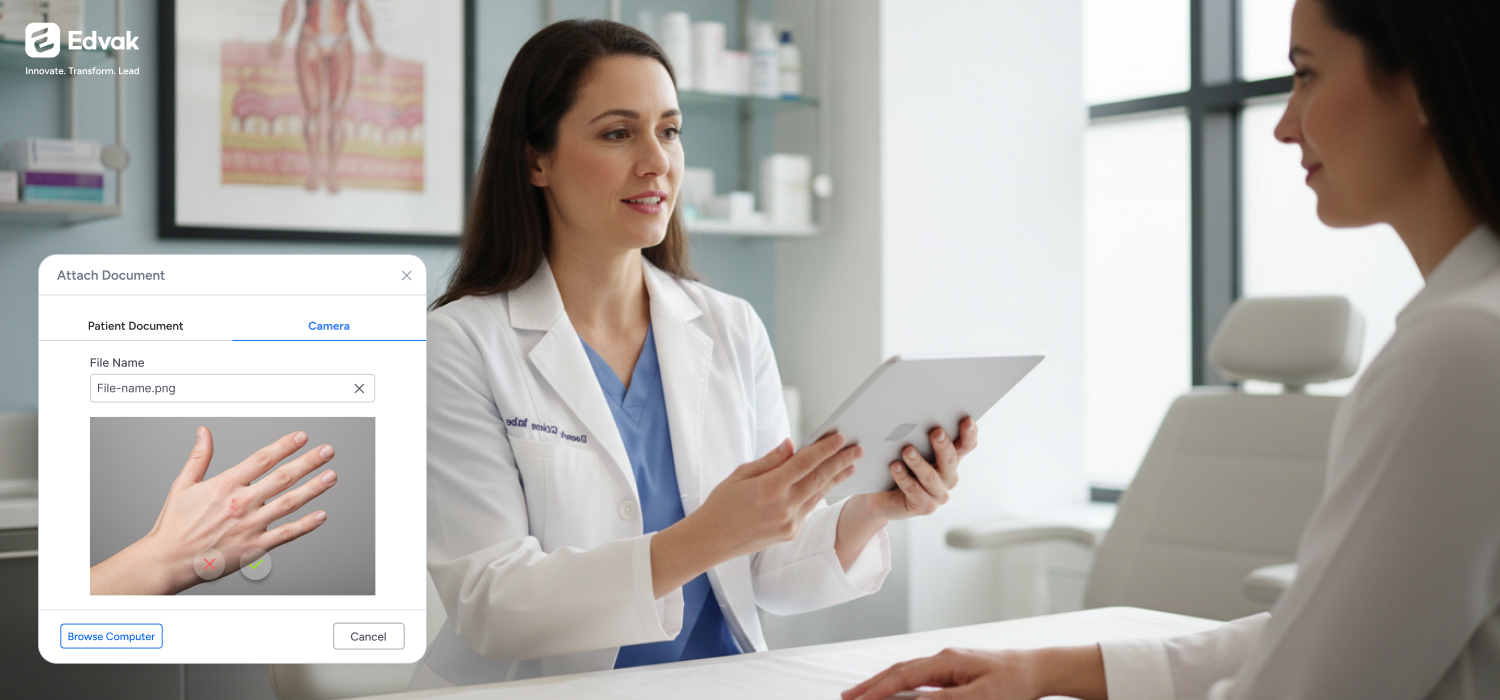
A modern dermatology EHR should treat photo documentation as part of the clinical workflow rather than as a simple attachment. Images should be connected directly to the patient encounter, aligned with structured notes and accessible for long-term comparison.
Platforms designed around integrated workflows, such as Edvak, approach dermatology documentation differently by combining AI-Powered Documentation, Document Management and Integrated Speech-to-Text so visual records support the clinical encounter instead of slowing it down.
Why Photo Documentation Matters in Dermatology
Dermatology relies heavily on visual assessment. Many diagnoses and treatment decisions depend on observing changes in the skin over time.
Dermatology clinics use photo documentation to support several key workflows:
- monitoring lesion progression
- documenting treatment response
- comparing cosmetic procedure outcomes
- tracking chronic skin conditions
- supporting teledermatology consultations
When images are properly linked to the patient record, providers can quickly review historical findings and make more informed clinical decisions.
For dermatology practices evaluating dermatology EHR software, image documentation workflows should be considered a core feature rather than an optional add-on.
What Is Dermatology Photo Documentation in an EHR?
Dermatology photo documentation refers to capturing clinical skin images and linking them directly to the patient’s electronic health record.
A dermatology EHR should support:
- encounter-linked clinical photos
- lesion monitoring across visits
- before-and-after cosmetic treatment images
- secure storage of patient images
- structured notes aligned with visual findings
Platforms designed for dermatology workflows, such as Edvak, integrate AI-Powered Documentation, Document Management and Integrated Speech-to-Text so image documentation supports the clinical encounter.
Common Problems With Traditional Photo Documentation Workflows
Many dermatology clinics still rely on fragmented photo workflows.
Typical scenarios include:
- capturing images on separate devices
- storing photos in local folders
- uploading images after the visit
- saving cosmetic treatment photos outside the EHR
- manually attaching images to patient records
These approaches introduce several challenges.
First, providers and staff must spend time transferring files between systems. Second, images may lose context if they are not tied directly to the clinical encounter. Third, long-term comparison becomes more difficult when images are stored inconsistently.
Disconnected workflows also increase the risk of security and compliance issues if clinical photos are stored outside the controlled environment of the EHR.
Key Features of Effective Dermatology Photo Documentation
A well-designed dermatology photo documentation system should support several essential capabilities.
Encounter-Linked Image Storage
Photos should be connected directly to the patient encounter rather than stored separately. This ensures that visual documentation aligns with the clinical note.
Longitudinal Image Comparison
Dermatology providers frequently compare current images with historical photos to evaluate lesion changes or treatment progress. EHR systems should make these comparisons easy.
Secure Storage
Clinical images must be stored within a secure system that protects patient information and limits unauthorized access.
Integration With Clinical Documentation
Images should support the written clinical note and assessment. Providers should be able to reference visual findings within their documentation.
Edvak supports these workflows by integrating image handling directly with AI-Powered Documentation and Document Management so photos remain connected to the clinical encounter.
Photo Documentation for Lesion Monitoring
Lesion tracking is one of the most important uses of photo documentation in dermatology.
Providers frequently monitor:
- suspicious lesions
- pigmentation changes
- border irregularities
- treatment response
- recurrence after procedures
When photos are tied directly to the patient encounter, dermatologists can review previous images and compare them with current findings.
This allows providers to detect subtle changes that may affect diagnosis or treatment planning.
Edvak supports this workflow by linking visual records with structured clinical notes. Providers can review prior images, capture new photos and document lesion characteristics during the same encounter.
This integrated workflow helps maintain accurate records while reducing the need to switch between systems.
Photo Documentation in Cosmetic Dermatology
Cosmetic dermatology also depends heavily on image documentation.
Clinics frequently capture before-and-after photos for procedures such as:
- Botox treatments
- dermal fillers
- laser therapy
- skin resurfacing
- pigmentation correction
These photos help providers demonstrate treatment outcomes and guide future care decisions.
When cosmetic images are stored within the EHR rather than in separate media libraries, providers can easily review treatment history and patient progress.
Through integrated Document Management, Edvak allows dermatology clinics to store cosmetic documentation alongside medical records, helping providers maintain complete patient histories.
Why Photo Documentation Is Critical in Dermatology
Dermatology relies heavily on visual comparison over time. Photo documentation helps providers:
- monitor lesion progression
- evaluate treatment response
- document cosmetic outcomes
- compare historical images across visits
- improve diagnostic accuracy
When images are linked directly to the patient encounter, providers can review previous findings and maintain clearer longitudinal documentation.
AI-Powered Dermatology Documentation
Images alone do not tell the full clinical story. Dermatology documentation must combine visual findings with structured clinical notes.
For example, a provider reviewing a photo might document:
- reduced inflammation
- improvement in pigmentation
- changes in lesion borders
- healing progress following treatment
Systems that support AI-Powered Documentation help organize these observations within structured clinical notes.
Edvak uses Darwin AI to help providers capture clinical observations naturally while structuring documentation into organized SOAP notes. This reduces repetitive entry and improves consistency across visits.
Security Considerations for Dermatology Photo Documentation
Clinical photos linked to patient records are considered protected health information. Dermatology clinics must ensure these images are handled securely.
Important security considerations include:
- controlled user access
- secure storage
- audit visibility
- HIPAA-ready handling of patient data
When images are stored outside the EHR, clinics risk exposing sensitive patient information.
By integrating image documentation with the patient chart, Edvak keeps visual records within a controlled and secure environment.
Photo Documentation in Teledermatology
Teledermatology has expanded rapidly in recent years. Many virtual dermatology consultations rely on images submitted by patients or captured during video visits.
A dermatology EHR should support:
- image review during virtual encounters
- integration with clinical notes
- secure storage of uploaded patient photos
- continuity between virtual and in-person visits
When teledermatology images are integrated with the patient chart, providers can maintain a consistent record of the patient’s condition.
Key Features to Look for in Dermatology Photo Documentation Software
When evaluating dermatology EHR systems, clinics should ensure the platform supports:
- encounter-linked image documentation
- longitudinal comparison of patient images
- secure HIPAA-ready image storage
- integration with clinical notes
- before-and-after cosmetic photo tracking
- teledermatology image workflows
Edvak supports these capabilities through integrated workflows that combine AI-Powered Documentation, Document Management and dermatology-ready charting.
Dermatology Photo Documentation Checklist
Dermatology clinics evaluating EHR platforms should ensure the system supports:
- encounter-linked photo documentation
- secure storage of clinical images
- longitudinal comparison of images across visits
- documentation aligned with visual findings
- before-and-after comparisons for cosmetic treatments
- integration with teledermatology workflows
Platforms designed with integrated workflows, such as Edvak, combine AI-Powered Documentation, Document Management and Integrated Speech-to-Text to support these capabilities within one system.
AI-First vs Add-On Photo Documentation Systems
Not all EHR platforms handle dermatology photo documentation in the same way.
Some systems treat images simply as file attachments that must be uploaded manually.
Add-On Image Workflows
- photos uploaded after the visit
- images stored separately from notes
- comparison requires manual searching
- documentation and images remain disconnected
AI-First Image Workflows
- images captured within the encounter workflow
- documentation structured around visual findings
- prior images accessible during the visit
- image review integrated with clinical documentation
Edvak supports an AI-first workflow where images and notes work together within the clinical encounter.
Dermatology Photo Documentation Workflow
A typical dermatology photo documentation workflow includes:
- Capturing clinical images during the encounter
- Linking images directly to the patient chart
- Reviewing historical photos for comparison
- Documenting clinical observations in the encounter note
- Using images to support diagnosis and treatment decisions
AI-first dermatology EHR systems such as Edvak integrate image capture, documentation and workflow automation within a single platform.
Dermatology EHR Systems Built for Visual Documentation
For dermatology clinics in the United States, photo documentation is an essential part of patient care.
EHR systems that integrate image workflows with documentation, scheduling and operational workflows can significantly improve efficiency.
Edvak supports dermatology practices through a unified architecture that includes:
- AI-Powered Documentation
- Integrated Speech-to-Text
- Document Management
- Inventory Management
- Two-Way Scheduling
By connecting visual documentation with the clinical encounter, dermatology clinics can maintain clearer records while reducing administrative complexity.
Frequently Asked Questions About Dermatology Photo Documentation
-
What is dermatology photo documentation in an EHR?
Dermatology photo documentation refers to capturing clinical images and linking them to the patient record. Edvak integrates image documentation directly with clinical notes so providers can review visual findings during the encounter.
-
Why do dermatology clinics use photo documentation?
Photos help track lesion changes, treatment progress and cosmetic procedure outcomes. Edvak supports this workflow by keeping images connected to the clinical chart and structured documentation.
-
Can dermatology EHR software store before-and-after photos?
Yes. Edvak supports storage of before-and-after photos within the patient record so providers can compare treatment outcomes and maintain clear documentation.
-
How does Edvak support lesion tracking with photos?
Edvak allows providers to link images directly to the patient encounter and review prior photos during follow-up visits. This helps dermatologists monitor lesion changes more effectively.
-
Are dermatology clinical photos protected health information?
Yes. Clinical photos linked to patient records are considered protected health information. Edvak keeps images inside a secure environment to help clinics maintain compliance.
-
Can dermatology photos be used during telehealth visits?
Yes. Dermatology clinics often review images during virtual consultations. Edvak supports image review and documentation within the telehealth workflow.
-
Does photo documentation improve dermatology workflow efficiency?
Yes. When images are integrated with the patient chart, providers spend less time managing files and more time focusing on clinical care. Edvak supports this workflow through integrated documentation.
-
What should clinics look for in dermatology photo documentation software?
Clinics should look for encounter-linked images, secure storage and easy comparison across visits. Edvak integrates these features into a unified dermatology workflow.
-
Why do dermatology clinics prefer integrated photo workflows?
Integrated workflows reduce manual uploads and help providers review images within the patient record. Edvak combines photo documentation with structured clinical notes and scheduling workflows.
-
Can dermatology photo documentation support cosmetic treatments?
Yes. Cosmetic dermatology procedures often require before-and-after images. Edvak supports documentation for both medical and cosmetic dermatology workflows.
-
Why choose an AI-first dermatology EHR for photo documentation?
AI-first systems help organize documentation around clinical observations rather than relying on manual templates. Edvak supports this approach through AI-Powered Documentation and integrated workflow design.
Ready to take the next step?
Get a personalized demo and see how Edvak can drive real impact to your practice.
-
Question
Answer
Related Blogs




More Categories
Edvak.com Terms & Conditions Privacy Policy © 2026 Edvak. All rights reserved.