

🕐 Read Time: 4 min
Edvak vs eClinicalWorks: The Complete 2026 Guide for Family Medicine Practices
Running a family medicine practice in 2026 means your EHR isn’t just software, it’s the difference between finishing notes by dinner or charting until midnight. Between seeing patients, managing refills, and keeping up with quality measures, your documentation system should work for you, not against you.
We have spent time understanding how family medicine practices actually work, and here’s what matters: your EHR should handle your busiest days smoothly without requiring an IT department to keep it running.
The Real Test: Your Three Most Common Scenarios
Before diving into features and pricing, think about these three encounters that define your typical day:
The 15-minute sick visit – A patient with acute symptoms who needs quick documentation, a prescription, and instructions to get them on their way.
The complex chronic care appointment – Your diabetic patient with hypertension who’s on eight medications and needs monitoring, adjustments, and care coordination.
The annual wellness visit – Preventive care that requires screening discussions, quality measure documentation, and health maintenance planning.
If your EHR makes these three scenarios difficult, every other feature becomes irrelevant. Your team will struggle daily, and those struggles compound into burnout.
Two Very Different Philosophies: eCW vs Edvak
Let’s be direct about what you are comparing:
eClinicalWorks has been in the market for years and offers a comprehensive platform. It works well when you have dedicated IT resources, time to build custom templates, and staff bandwidth for extensive training. Think of it as the system for practices that enjoy configuration and don’t mind investing significant setup time to optimize workflows.
Edvak takes a different approach entirely. We built our platform around a simple premise: family medicine physicians should spend time with patients, not clicking through templates. Our AI technology converts your natural conversation into structured documentation, automates routine tasks, and gets you home on time.
Where Your Day Gets Lost (And How to Get It Back)
Documentation: The Biggest Time Drain
You already know this: documentation consumes your day. Between acute visits, chronic disease management, and preventive care, you’re documenting constantly often in cramped rooms without proper workspace.
The eClinicalWorks approach: Templates drive everything. When perfectly configured by your IT team and your staff is thoroughly trained, documentation flows reasonably well. When templates aren’t optimized or staff training gaps exist, you’re clicking through endless fields wondering why this simple URI visit is taking seven minutes to document.
The Edvak difference: Our Conversation to Notes feature lets you talk naturally during the visit. Darwin AI listens, structures the information into a proper SOAP note, and lets you edit anything that needs adjustment. The AI learns your documentation style, remembers your preferences, and gets better over time.
Real impact: Our practices report cutting documentation time from 12-15 minutes per patient to 4-6 minutes. That’s physicians leaving the office at 5:30 PM instead of 8 PM.
Demo challenge: Ask both Edvak and eCW to show you a URI documentation workflow from scratch. Time it. Count the clicks. Watch where the physician’s attention goes toward the patient or toward the screen. That tells you everything.
Prescribing: Where Seconds Add Up to Hours
Refills never stop in primary care. The best eRx system is the one you don’t think about because it works so smoothly and safely that it’s invisible.
eClinicalWorks: Offers mature prescribing workflows once your templates and favorites are configured. The system handles standard prescriptions adequately with proper setup.
Edvak: We focus on eliminating friction entirely. Darwin AI provides integrated decision support for interactions and dosing without interrupting your workflow. The system anticipates problems before they become errors and routes refill requests intelligently so they land with the right team member.
Demo challenge: Bring your five worst prescribing scenarios: the controlled substance requiring EPCS, the patient needing eight refills simultaneously, the pharmacy that consistently sends wrong information, the new medication with a complex dosing schedule, and the prior authorization nightmare. Watch which system handles this faster with fewer clicks.
Task Management: What Determines Staff Happiness
Here’s what nobody emphasizes enough: your inbox and task management determine whether your staff stays or leaves.
Lab results, refill requests, referral letters, prior authorizations, patient messages everything needs routing to the right person at the right time. Poor task management creates a shared inbox nightmare where critical items get buried and staff members dread opening their computers each morning.
eClinicalWorks: Can support role-based routing with proper configuration. The capability exists, but implementation quality depends entirely on how much time and expertise you invest in setup.
Edvak: Darwin AI routes tasks automatically based on content, urgency, and role. Lab results requiring physician review go directly to you. Refill requests for controlled substances versus maintenance medications route appropriately. Prior authorization alerts go to the staff member who handles them. This intelligence is built-in, not something you configure after months of optimization.
Real impact: Our practices report 60% reduction in time spent managing inbox clutter and 40% fewer did you see this message? conversations among staff.
Everything Else That Actually Matters
Scheduling and Patient Intake
Modern patients expect online scheduling that works correctly and intake forms they can complete before arrival. Both platforms offer these features, but implementation differs significantly.
eClinicalWorks: Provides scheduling functionality that requires configuration to match your availability rules, appointment types, and provider preferences.
Edvak: Our online scheduling integrates seamlessly with automated intake data charting. When patients complete intake forms, Darwin AI extracts relevant information directly into the chart before you walk in the room. Your medical assistant isn’t re-entering data from paper forms.
Telehealth Integration
If you are still conducting virtual visits, documentation during video calls creates a challenge you are simultaneously engaging with the patient and trying to type notes.
eClinicalWorks: Offers telehealth capabilities depending on your configuration and setup choices.
Edvak: Darwin AI functions as your scribe during telehealth visits, generating structured notes from your conversation while you maintain eye contact with the patient on screen. No after-hours documentation for virtual visits.
Billing and Revenue Cycle
Even practices outsourcing billing need eligibility verification before appointments, documentation supporting proper coding, and clean claims submission.
eClinicalWorks: Supports comprehensive revenue cycle workflows with appropriate configuration and integration setup.
Edvak: Real-time insurance eligibility checks happen automatically. Darwin AI analyzes your documentation and suggests appropriate E&M codes based on actual work documented. Our practices see 25-30% reduction in claim denials from documentation issues.
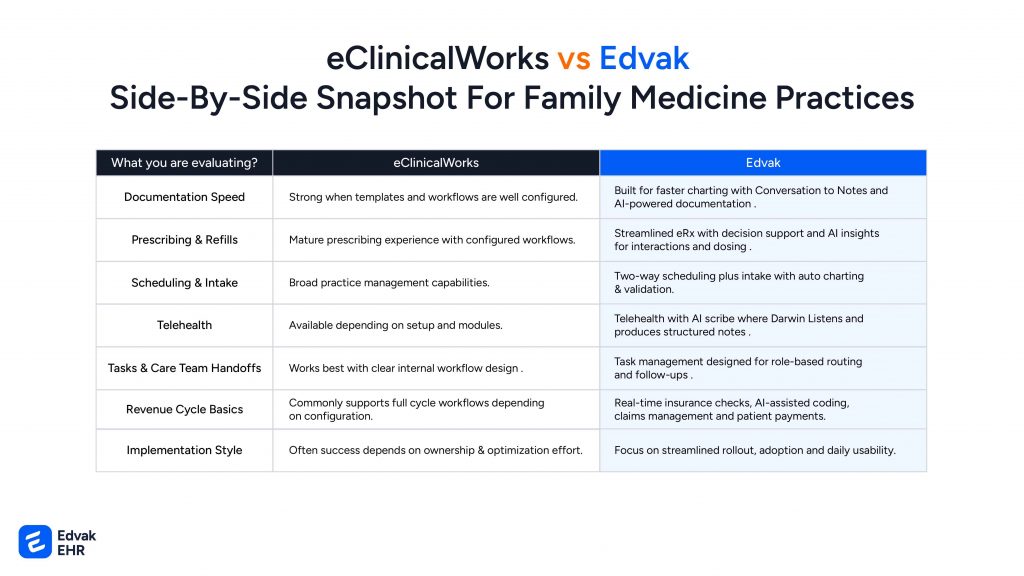
Edvak vs eClinical Works Comparison
Why Family Medicine Practices Choose Edvak
Speed to Value
Dr. Sarah Chen switched her four-provider practice from eClinicalWorks to Edvak last year. With eCW, we spent six months configuring templates. With Edvak, we were efficiently documenting in week two. The difference wasn’t subtle, it was night and day.
Real AI That Actually Helps
You have heard plenty of vendors claim AI-powered features. Darwin AI isn’t marketing language, it’s technology that concretely reduces the time you spend on documentation.
Our AI:
- Converts natural speech to structured SOAP notes
- Learns your documentation preferences and terminology
- Suggests appropriate diagnosis codes from your narrative
- Identifies potential medication interactions in real-time
- Routes tasks automatically based on content and urgency
- Improves continuously as it learns your practice patterns
Built for How You Actually Work
We designed Edvak by watching family medicine practices struggle with systems built for hospitals or specialists. Your workflows are unique you see tremendous variety, need flexibility for acute and chronic care, and can’t afford systems that slow you down.
Implementation That Doesn't Disrupt Your Practice
Switching EHRs feels risky. We understand. That’s why our implementation process focuses on minimizing disruption:
- Week 1-2: Data migration and system configuration
- Week 3-4: Staff training (8-12 hours per role, not 20+)
- Week 5-6: Parallel testing with your actual workflows
- Week 7-8: Go-live with dedicated on-site support
- Week 9-12: Optimization and refinement
Compare this to the 4-6 month implementations that consume enormous staff time with eClinicalWorks.
Support When You Need It
Friday at 3 PM when something breaks? We answer. Holiday weekend when you need help? We are available. Growing practices can’t afford EHR problems that wait until Monday morning.
Our support includes:
- Direct phone access to clinical support staff (not just tier-1 technicians)
- Average response time under 15 minutes for urgent issues
- On-site support during go-live week
- Ongoing optimization consultation quarterly
- Regular training refreshers as staff turns over
When eClinicalWorks Might Make Sense
We are not going to tell you eClinicalWorks never works. Here’s when it might be appropriate:
- You have dedicated IT staff who enjoy extensive system configuration
- Your practice prefers highly structured, template-driven workflows
- You’re willing to invest 6+ months in implementation and optimization
- Your team has excess capacity for extensive training programs
- You value having a widely-adopted platform with an established user base
For many practices, these conditions don’t apply. Most family medicine practices don’t have IT departments, can’t afford six-month implementations, and need systems that work efficiently without constant optimization.
The Questions You Should Ask Before Deciding
Don’t just take our word or any vendor’s marketing materials. Ask these specific questions:
About Data Migration
- What specific data transfers from our current system?
- How far back does historical data import?
- What happens to scanned documents and images?
- Can we access our old system after migration for reference?
About Training
- How many training hours per staff role?
- Is training on-site or remote?
- What happens when new staff members join?
- Do you provide refresher training as the system updates?
About Support
- What are your response times for urgent issues?
- Can we speak directly with clinical support staff?
- What support is available outside business hours?
- Is there additional cost for premium support?
About Real-World Performance
- Can we speak with three practices similar to ours who went live 6+ months ago?
- What were the biggest challenges during implementation?
- How has documentation time actually changed?
- What would they do differently knowing what they know now?
What Makes This Decision Urgent
Family medicine faces mounting pressures: rising patient expectations, increasing administrative burden, staff shortages, and physician burnout reaching crisis levels. Your EHR either helps address these challenges or makes them worse.
The practices thriving in 2026 are those that made technology work for their team instead of asking their team to work harder around clunky technology.
The Honest Assessment
If you’re reading this, you’re probably frustrated with your current system or evaluating options for a new practice. Here’s what you should know:
Choose Edvak if:
- Documentation time is killing your evenings
- You want AI that demonstrably reduces clicking and typing
- Your practice lacks dedicated IT resources
- You need fast implementation (under 3 months)
- Staff satisfaction and retention matter to your practice
- You value modern, intuitive interfaces over legacy systems
- You’re tired of promising your family you’ll be home earlier
Choose eClinicalWorks if:
- You have IT staff dedicated to ongoing EHR optimization
- Your practice strongly prefers template-driven structured workflows
- You are comfortable with 6-month implementation timelines
- You have capacity for extensive staff training programs
- You want an established platform with a broad user base
- Customization control matters more than out-of-box efficiency
What you should do next?
We are not going to pressure you. This decision affects your practice for years, and you need to make it based on real evaluation, not sales tactics.
Here’s what we recommend:
Step 1: Schedule live demonstrations with both platforms. Not scripted vendor presentations actual workflow demonstrations using your scenarios.
Step 2: Bring your team. Your medical assistants, front desk staff, and billing personnel need to evaluate these systems because they’ll use them daily.
Step 3: Test the three critical workflows we mentioned at the beginning: sick visit, chronic care, and preventive care. Time each workflow. Count the clicks. Ask where your attention goes patient or screen.
Step 4: Talk to practices similar to yours. We’ll provide references from family medicine practices in your region with similar patient volume and staffing.
Step 5: Compare not just features but total cost of ownership: implementation time, training burden, staff productivity during transition, and ongoing support needs.
Ready to See the Difference?
The gap between template-clicking and AI-powered conversation is significant. We can describe it, but you need to see it with your actual workflows.
Book a Edvak demo tailored to your practice. We’ll show you:
- Exactly how Darwin AI handles your typical documentation scenarios
- Real-time demonstration of complex prescription workflows
- How task routing works for your specific roles
- Integration with your current lab and pharmacy vendors
- Actual implementation timeline for a practice your size
No high-pressure sales tactics. No generic feature presentations. Just an honest evaluation of whether Edvak solves your specific challenges.
Schedule Your Demo Now
Why you should Choose Edvak.
Your EHR should make your team’s day easier, not harder. It should reduce evening charting, not extend it. It should help you see patients efficiently while maintaining quality documentation.
After years of watching family medicine practices struggle with systems designed for hospitals or specialists, we built Edvak specifically for the unique demands of primary care. Darwin AI isn’t just a feature, it’s fundamentally different approach to clinical documentation.
The choice is yours. We are confident that when you see Edvak handle your actual workflows, the difference will be clear. But don’t decide based on blog posts or feature lists. See both systems work with your scenarios. Talk to practices using them. Make an informed decision.
Your team deserves an EHR that works as hard as they do. Let us show you what that looks like.
Frequently Asked Questions
-
How is Edvak different from eClinicalWorks?
Edvak uses Darwin AI to convert clinical conversations into structured documentation automatically, reducing documentation time by 60-70% compared to template-based systems. eClinicalWorks relies on extensive template configuration and clicking. Edvak deploys in 2-4 months with minimal training, while eClinicalWorks typically requires 4-6 months and extensive configuration by IT staff.
-
How much does Edvak cost compared to eClinicalWorks?
While specific pricing varies by practice size and needs, Edvak's total cost of ownership is often 20-30% lower when you account for reduced implementation time, less training required, minimal IT resources needed, and faster return to full productivity. Request detailed pricing comparisons for your specific practice size during your demo.
-
Can I migrate my data from eClinicalWorks to Edvak?
Yes. We have extensive experience migrating practices from eClinicalWorks to Edvak. Our migration process transfers patient demographics, clinical history, medications, allergies, lab results, and documents. The process typically takes 2-3 weeks and includes verification to ensure data accuracy. You can retain read-only access to eClinicalWorks for historical reference during transition.
-
How long does Edvak implementation take?
Edvak implementation typically takes 8-12 weeks from contract to full go-live. This includes data migration (2-3 weeks), system configuration (1 week), staff training (8-12 hours per role), parallel testing (2 weeks), and go-live support. This is significantly faster than eClinicalWorks implementations which average 4-6 months due to extensive template building and configuration requirements.
-
Does Edvak really reduce after-hours charting?
Yes. Our practices report 60-70% reduction in documentation time through Darwin AI's conversation-to-notes capability. Dr. Michael Rodriguez from Austin Family Medicine reports: "I used to finish notes at 9 PM. Now I'm done by 5:30 PM most days. The difference is life-changing." This isn't marketing—it's the reality of eliminating template clicking through conversational AI.
-
What training is required for Edvak?
Edvak training requires 8-12 hours per provider, 10-14 hours per medical assistant, and 6-8 hours for front desk staff. Training is role-specific and focuses on actual workflows rather than system configuration. Compare this to eClinicalWorks which typically requires 16-24 hours per provider due to template complexity and extensive feature configuration.
-
Is Darwin AI accurate for clinical documentation?
Darwin AI achieves 95%+ accuracy for routine documentation and improves as it learns your specific terminology and documentation preferences. Providers always review and edit notes before signing, maintaining complete control. Our AI handles medical terminology, abbreviations, and complex clinical scenarios accurately while continuously learning from your corrections.
-
Can Edvak integrate with my current lab and pharmacy vendors?
Yes. Edvak integrates with major lab vendors (Quest, LabCorp, regional labs) and pharmacy systems through standard HL7 and FHIR interfaces. We also connect with your practice management system, billing platform, and other tools. During your demo, we'll verify integration capabilities with your specific vendors and discuss any unique interface needs.
-
What happens if I'm not satisfied after switching to Edvak?
We're confident you'll see immediate efficiency improvements, but we understand switching anxiety. Our contract includes clear performance benchmarks and implementation milestones. If Edvak doesn't meet agreed-upon performance standards during implementation, we work with you to resolve issues or provide exit options. Ask about specific terms during your demo consultation.
-
How does Edvak handle MIPS and quality reporting?
Edvak automatically tracks MIPS quality measures throughout patient encounters, calculates performance scores in real-time, and submits data electronically to CMS. Darwin AI identifies quality measure opportunities during visits and prompts appropriate documentation. Our practices see 15-20% improvement in quality scores due to better real-time tracking versus retrospective reporting.
-
Can I try Edvak before committing?
Edvak scales from solo practices to large multi-location groups. Solo practitioners especially benefit from Darwin AI because you don't have IT staff to optimize templates, you need a system that works immediately. Our pricing scales appropriately for practice size, and implementation for solo practices often completes in 3-4 weeks versus 7-8 for larger groups. We offer personalized demonstrations using your actual clinical scenarios and can arrange practice visits to see Edvak in live clinical environments. While we don't offer traditional free trials due to integration and training requirements, we work with practices to ensure you are confident in the decision before commitment. Our implementation process includes milestone-based reviews with exit options if performance doesn't meet expectations.
-
Does Edvak work for solo practitioners or only larger practices?
Edvak scales from solo practices to large multi-location groups. Solo practitioners especially benefit from Darwin AI because you don't have IT staff to optimize templates, you need a system that works immediately. Our pricing scales appropriately for practice size, and implementation for solo practices often completes in 3-4 weeks versus 7-8 for larger groups.
Ready to take the next step?
Get a personalized demo and see how Edvak can drive real impact to your practice.
Related Blogs




More Categories
Edvak.com Terms & Conditions Privacy Policy © 2026 Edvak. All rights reserved.