
🕐 Read Time: 16 min
Body Mapping in Dermatology: What It Is, Why It Matters, and Why Edvak Does It Best
Dermatology is a visual specialty. More than almost any other field in medicine, what a dermatologist sees and how that changes over time is the clinical data. A lesion’s border, its color shift between January and June, the subtle thickening of a patch that looked benign three months ago: these are not incidental observations. They are the diagnosis.
Yet most EHR systems still ask dermatologists to document lesions the same way a general practitioner documents a sore throat: in text boxes. “3mm erythematous papule, upper left forehead.” That note lives in isolation. At the next visit, it tells the clinician almost nothing useful. There is no image. There is no baseline. There is no comparison.
That mismatch has real clinical consequences, real operational costs, and real liability exposure. Body mapping and longitudinal lesion tracking exist to close that gap. And among the dermatology EHR platforms available in 2026, Edvak is the only one that treats body mapping as a native, integrated part of the clinical workflow rather than a feature added on top of a general-purpose system.
This article explains what body mapping is, how it works, what good lesion tracking looks like in practice, and why Edvak‘s approach sets the standard for the specialty.
What Is Body Mapping in Dermatology?
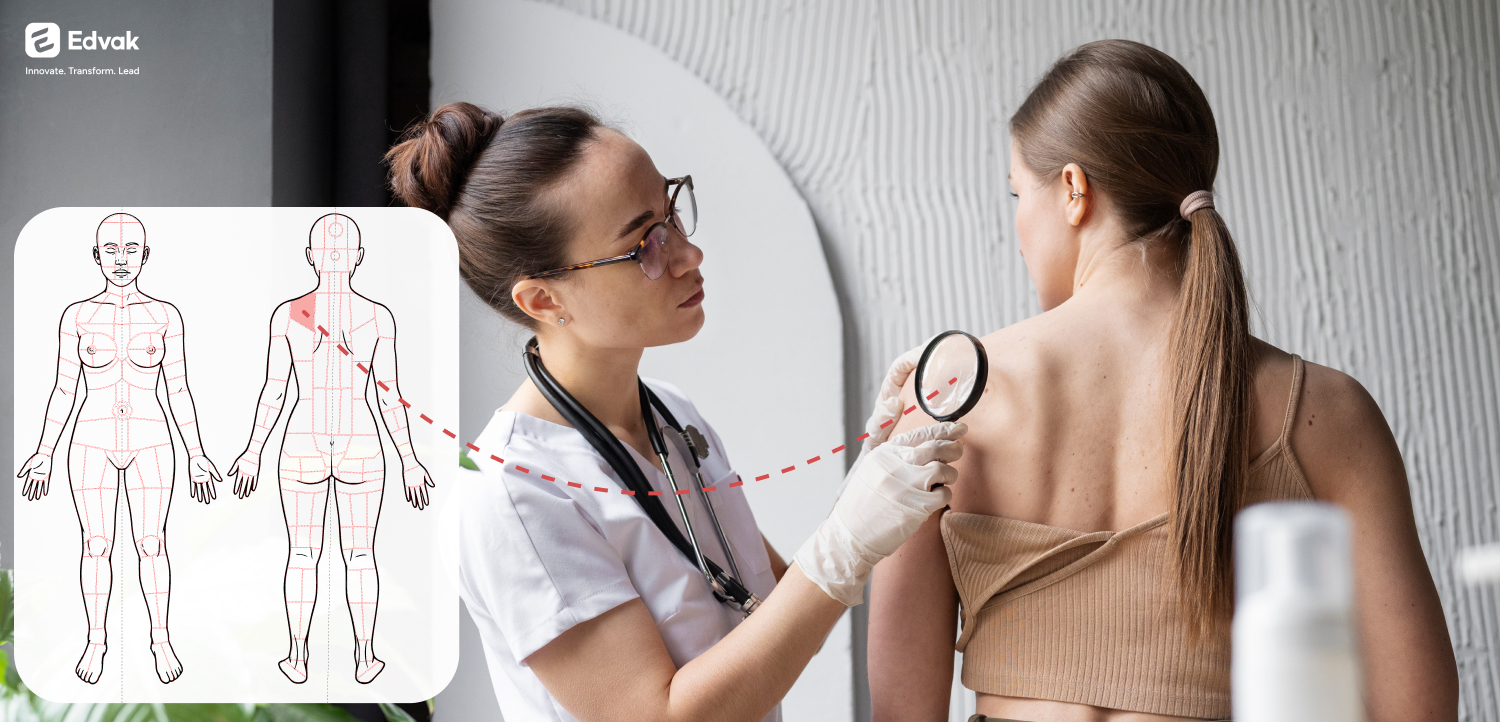
Body mapping in dermatology is a documentation method that allows clinicians to visually mark lesion locations on an anatomical diagram of the human body, then attach clinical notes, images, and treatment data directly to those pinned locations.
Instead of a free-text description, a dermatologist using body mapping can tap the exact location on a visual anterior or posterior body diagram, attach a clinical photograph to that precise site, record structured lesion attributes including size, color, texture, and borders, link medications or procedures performed at that site, and return to that exact pinned record at every subsequent visit.
The result is not a note. It is a living, visual, longitudinal patient record.
In Edvak, this is not a bolt-on feature. Body mapping is built into the core documentation workflow alongside AI-Powered Documentation, Integrated Speech-to-Text, and Clinical Decision Support. Every lesion pin, every attached image, and every structured attribute flows directly into the clinical note and the billing record without any manual transfer.
For a deeper look at how photo documentation integrates with this workflow, the guide on Dermatology Photo Documentation in an AI EHR covers the full picture.
What Is Longitudinal Lesion Tracking and Why Does It Matter Clinically?
Longitudinal lesion tracking is the practice of comparing a lesion’s appearance, size, and behavior across multiple patient visits over time. In dermatology, this is not a documentation preference. For several categories of care, it is the clinical standard.
Melanoma screening depends on it. Change in a lesion’s border, color, diameter, or elevation is a primary diagnostic indicator. Without a structured visual record from the prior visit, the clinician is working from memory or from a text description that cannot show what the lesion actually looked like.
Chronic skin conditions require it. Psoriasis, eczema, and rosacea are managed across months and years. Flare patterns, treatment responses, and the progression or resolution of lesions are only visible when documented consistently over time.
Post-procedure follow-up relies on it. After excision, cryotherapy, or Mohs surgery, confirming that a treated site is healing correctly requires a visual baseline. A note saying “site appears improved” is not a clinical comparison. A side-by-side image from the day of procedure and the two-week follow-up is.
Suspicious lesion surveillance demands it. Borderline findings that do not yet warrant biopsy need to be monitored with precision. If the record from six months ago is a text note and the record today is a different text note, the clinician cannot make a confident decision about whether the lesion has changed.
Without structured tracking, this comparison happens informally. Clinicians scroll through old notes, rely on memory, or ask patients what a lesion used to look like. With proper lesion tracking, Visit 1, Visit 2, and Visit 3 images sit side by side. The clinical picture is immediate and defensible.
How Edvak's Body Mapping Works: The Full Workflow
Most EHR platforms that claim to support body mapping offer a diagram where a clinician can place a pin and attach an image. That is where the feature ends. The image lives in a gallery. The pin does not connect to the note. The procedure is not linked to the lesion site. The billing code does not know what was done or where.
Edvak is built differently. Here is how the body mapping workflow operates from the moment a patient arrives.
Step 1: Open the body diagram within the encounter. The clinician or MA opens the body mapping view inside the patient chart. A complete anterior and posterior anatomical diagram is available, covering the face, scalp, neck, trunk, extremities, hands, feet, and nails.
Step 2: Pin the lesion location with precision. The clinician taps the exact anatomical location. Multiple pins can be placed in a single session for patients presenting with more than one site of concern. Each pin is independent with its own attached data.
Step 3: Attach structured clinical details and images. A panel opens at each pin. The clinician records structured lesion attributes, including size, shape, color, borders, and texture. A photograph is captured directly via tablet or mobile device and attaches to that specific pin, not to the encounter in general. Clinical notes are added and, through Edvak‘s AI-Powered Documentation and Conversation Capture to Structured Notes, the spoken clinical narrative is converted into structured documentation simultaneously.
Step 4: Link procedures and medications. Any procedure performed at the pinned lesion site, whether a biopsy, cryotherapy, or excision, is linked directly to that body map entry. Medications prescribed in relation to that site are linked through E-Prescribing and Medication Management. Nothing floats in isolation.
Step 5: Auto-capture billing codes. As the encounter closes, Edvak’s Auto Capture of ICD and CPT Codes generates the appropriate codes based on what was documented in the body map, the clinical note, and the procedure record. The clinician reviews, confirms, and submits. There is no separate coding step.
Step 6: Compare at every future visit. At the next appointment, the clinician reopens the body map. Every prior pin is visible. Every prior image is attached to its site. The timeline view shows Visit 1, Visit 2, and Visit 3 images side by side with dates and notes. The clinical comparison is immediate.
This is the workflow difference between a general EHR that has added a body diagram as a checkbox feature, and Edvak, where body mapping is how dermatology is practiced inside the system. The full context of how AI documentation integrates into this workflow is covered in the article on AI Documentation Workflow for Dermatology.

What a Dermatology EHR Body Mapping Feature Must Include
Not all body mapping tools are equal. When evaluating any platform, these are the capabilities that separate a functional clinical tool from a cosmetic checkbox on a feature list.
Complete anatomical coverage. The diagram must include the full anterior and posterior body including face, scalp, nail beds, palms, and soles. These are high-frequency sites in dermatology that a generic body outline will not cover with the precision needed.
Per-lesion image attachment. Images must attach to the specific lesion pin, not to the encounter as a whole. When a patient returns six months later, the clinician needs to see the image for that forehead lesion immediately, not search through an image gallery of every photo taken across every visit.
Structured attribute fields. Size, shape, color, borders, and texture should be captured in structured fields that auto-populate the clinical note. This eliminates transcription, reduces error, and produces documentation that is consistent across providers and visits.
Longitudinal comparison view. The platform must present prior visit images and notes in a clear, chronological timeline for each pinned site. This is the clinical utility of the feature. Without it, the body map is a diagram, not a tool.
Native integration with notes, procedures, and billing. Body map data must flow into the clinical note, link to procedure documentation, and inform billing codes without manual intervention. Edvak’s Claims Management and Real-Time Insurance Eligibility Checks complete the billing loop from a single encounter workflow.
Mobile image capture at the point of care. The clinician photographs the lesion with a tablet or phone. The image attaches to the correct pin instantly. No uploading, no file transfer, no post-visit administrative step.
For practices evaluating how the coding side of this workflow operates, the breakdown of Dermatology AI EHR Coding and Billing Workflow is a useful reference. For those comparing platforms before making a decision, the Best Dermatology EHR Software for US Clinics in 2026 guide evaluates the leading options.
The Real Cost of Not Having This
When body mapping is absent from a dermatology practice’s workflow, the costs accumulate across every dimension of how the clinic operates.
Clinical risk rises. A lesion that has progressed is missed because there is no structured visual comparison available at the follow-up visit. The clinician has no baseline to measure against.
Encounter time increases. Clinicians spend minutes reconstructing context that should be instantly visible. Over a full clinic day, this adds up to meaningful lost capacity.
Patient confidence erodes. Patients who are asked to re-describe their history at every visit because the record does not carry the full story forward lose trust in the practice’s organization and continuity of care.
Revenue leaks. Procedures tied to specific lesion sites are under-documented and under-coded when body mapping is absent. The billing shortfall from consistently under-coded derm encounters compounds across hundreds of monthly claims.
Liability exposure grows. When a lesion progresses and a patient or their counsel later questions why biopsy was not recommended sooner, structured longitudinal records are the primary clinical defense. Text notes are not.
Edvak eliminates all five of these risks through a documentation architecture built specifically for the way dermatology actually operates. For practices ready to understand the full scope of what a purpose-built platform covers, the Dermatology Practice Management Software Guide for 2026 covers EHR selection, workflow migration, and feature evaluation in one place.
Frequently Asked Questions
-
What is body mapping in a dermatology EHR?
Body mapping is a feature that lets dermatologists pin lesion locations on an anatomical diagram, attach clinical images and notes to each pin, and track changes across multiple visits within the patient chart. In Edvak, body mapping is integrated natively with clinical notes, procedures, and billing rather than existing as a standalone module.
-
How is Edvak's body mapping different from other dermatology EHRs?
Most platforms offer body mapping as a diagram with basic image attachment. Edvak integrates body mapping with AI-powered documentation, structured note generation, procedure linking, e-prescribing, and auto-capture of ICD and CPT codes. The body map is not a separate tool. It is part of how the full encounter is documented and billed.
-
What dermatology conditions benefit most from longitudinal lesion tracking?
Melanoma surveillance, psoriasis and eczema management, acne progression monitoring, post-Mohs surgery follow-up, suspicious lesion surveillance, and cosmetic treatment outcome tracking. Any condition requiring more than one visit to manage benefits from structured visual tracking.
-
Does Edvak's body mapping work on mobile and tablet devices?
Yes. Clinicians photograph lesions directly with a tablet or mobile device during the encounter. The image attaches to the correct body map pin instantly without any separate upload step.
-
How does body mapping connect to billing in Edvak?
When a procedure is linked to a pinned lesion site and the clinical note is completed, Edvak's auto-capture engine generates the appropriate ICD and CPT codes based on what was documented. This reduces manual coding time and claim denial rates from under-coded encounters.
-
How do I evaluate whether a dermatology EHR has genuine body mapping capability?
Ask vendors specifically whether body mapping integrates with clinical notes, procedure documentation, and billing, or whether it is a standalone diagram feature. The guide on How to Choose a Dermatology EHR in the US in 2026 outlines the full evaluation criteria.
The Standard for Dermatology Documentation Is Visual, Longitudinal, and Integrated
The specialty of dermatology has always been visual. Documentation built for dermatology should be too.
Body mapping and longitudinal lesion tracking are not advanced features reserved for large academic practices. They are the baseline requirement for documenting dermatology at a clinical standard. Every patient with a suspicious lesion, a chronic skin condition, or a post-procedure follow-up deserves a record that shows what was found and how it has changed. That record should be built automatically through the normal clinical workflow, not assembled manually after the fact.
Edvak is the AI-assisted EHR and practice management platform built specifically for this standard. Body mapping, clinical image capture, AI-powered notes, auto-coded billing, e-prescribing, and real-time eligibility checks all operate as a single integrated workflow. There is no switching between tools, no manual image uploads, and no separate coding step.
If your current EHR treats dermatology documentation like general practice documentation, the clinical and financial cost of that mismatch is measurable. Edvak is the alternative built to eliminate it.
Ready to take the next step?
Get a personalized demo and see how Edvak can drive real impact to your practice.
Related Blogs




More Categories
Edvak.com Terms & Conditions Privacy Policy © 2026 Edvak. All rights reserved.